
Dear readers and followers of systems that trade in US dollars,
Recently, we have received questions from followers about the returns we show and the returns that followers have actually achieved. These were lower than the returns we show.
What is the reason for this?
The return we show is the return on the transactions. If there is a purchase, we take the purchase price in dollars and convert it at the euro exchange rate applicable at that time. If there is a sale, we take the sale price in dollars at the euro exchange rate applicable at that time. This ensures that the system return is calculated accurately and correctly.
So what is the difference?
If a sale takes place, the proceeds will be deposited into your dollar account. They will not be converted into euros immediately.
So if it is sold for $3,000, these dollars will be credited to your account. Suppose this takes place on a day when the euro = $1.10. These dollars will remain in your account for, say, one week or one month. During that period, the euro goes from $1.10 to $1.15. This means you have a loss of €118. (calculation: €3000/1.10 = €2727. And $3000/1.15 = 2609, so a loss of €118). This loss is not included in our calculation of the system return. If it had been the other way around, the profit would not have been included in our system return calculation either.
Euro/dollar chart
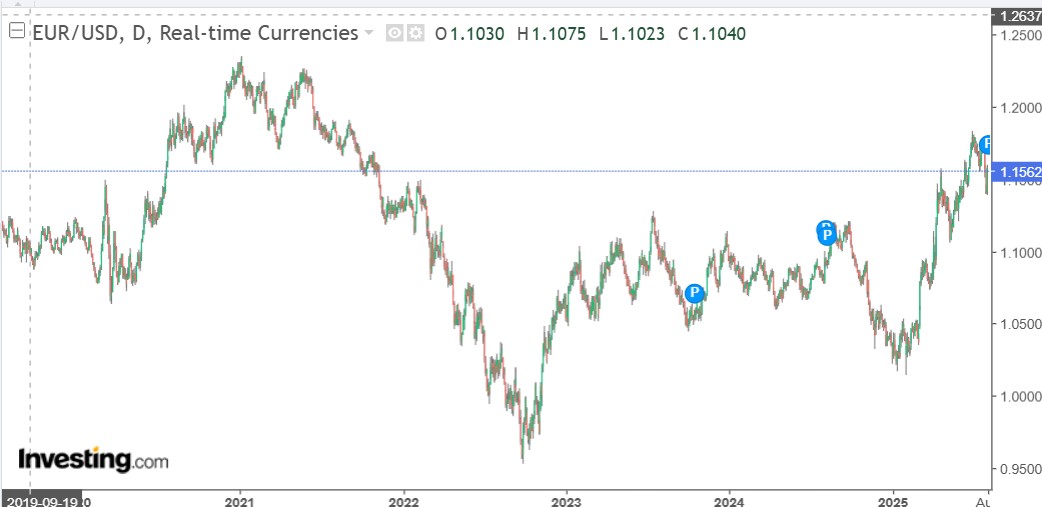
If we look at the euro/dollar chart, you can see periods when it makes you money and periods when it costs you money. And as mentioned, these pluses and minuses are not included in the systems' return overview.
What should you do if you don't want to take currency risk?
If you accept the pros and cons, then you don't need to do anything. But if you don't want to take any currency risk, it's best to sell your dollars regularly when you have a lot of dollars in your account. With $100 or $500, this is negligible. But with $3,000, it can already be attractive. Although a 5-cent increase is, of course, extreme.
How do you exchange dollars for euros?
Via ClientPortal (web portal)
Please log in.
Go to Transaction (or Transfer & Pay) → Convert currency.
Select the currency you have (e.g., USD) and the currency you want (EUR).
Enter the amount, confirm, and send the conversion.
Please allow approximately 48 hours (T+2 business days) for processing.
or
Via the MEXEMMobile app
Open the app and select Convert Currency in the side panel.
Select "Currency I Have" (e.g., USD) and "Currency I Want" (EUR).
Enter the amount and confirm the market transaction.
Automatic conversion of remaining balances takes place within two business days at no cost.
If you have any questions, please feel free to email us.